You can spend hours perfecting a design, choosing the right colours, refining the layout, and making sure every detail feels on-brand, only for the final print to come out blurry, jagged, or disappointingly soft. It’s a frustrating problem, and it usually comes down to one thing: supplying print files in high resolution. What looks crisp on a screen does not always translate well to print, especially when the artwork is enlarged for signage, displays, or promotional materials. The good news is that this issue is avoidable. When you understand why high-resolution artwork matters, what can go wrong with low-resolution files, and how to fix common issues early, you give your project the best chance of a polished, professional print result.
What High-Resolution Print Files Actually Mean
At its core, supplying print files in high resolution means giving your printer artwork with enough detail to reproduce cleanly at the final size. In print, image quality is often measured in DPI or PPI, which refers to how much visual information is packed into each inch of the design.
This matters because print captures detail differently than a phone or computer screen. A file that seems clear digitally may not hold up once it is enlarged onto a banner, wall graphic, corflute sign, or safety board.
High-resolution files typically help produce:
✔ Sharper text
✔ Cleaner logos
✔ More polished images
✔ Stronger overall presentation
For professional results, the file must suit the print method, material, size, and viewing distance. That’s why having a knowledgeable print partner review your artwork can prevent problems before production begins.
Why High Resolution Makes Such a Big Difference
When you print artwork, every detail becomes more visible. That includes the good parts, like sharp branding and clean lines, but also the bad parts, like compression, blurriness, or stretched graphics. This is why supplying print files in high resolution is so important for a successful print outcome.
For businesses, schools, event organisers, and safety teams, print is often more than decoration. It has a job to do. It may need to attract attention, communicate clearly, reinforce a brand, or meet compliance requirements.
High-resolution files are especially important for:
- Event banners and festival signage
- School wayfinding and wall graphics
- Safety and compliance signage
- Retail displays and promotional boards
- Floor vinyl and self-adhesive graphics
When the file quality is strong, the final print feels professional and trustworthy. When it is not, even a good design can lose impact fast.
What Can Go Wrong with Low-Resolution Files
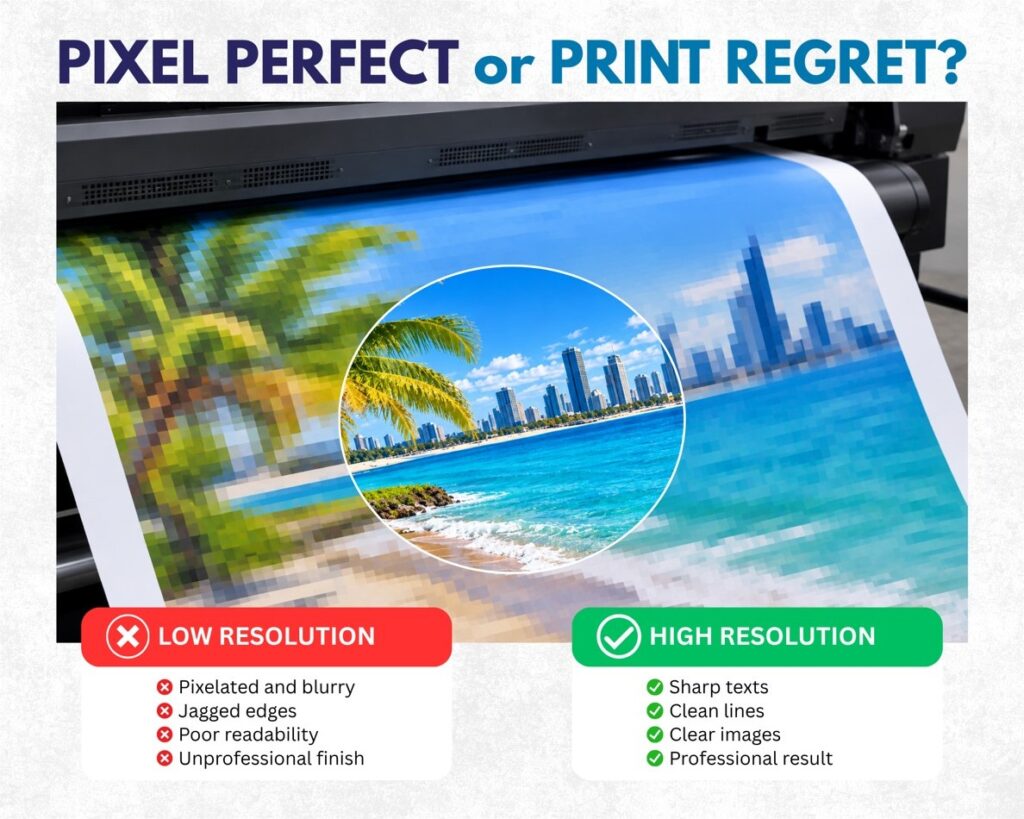
Low-resolution artwork can cause issues that are hard to ignore once printed. In some cases, the file may look acceptable at a small size on screen, but the moment it is scaled up, the flaws become obvious.
Here are some of the most common results of poor-resolution files:
✖ Pixelation, where the image looks blocky or square (think Minecraft)
✖ Blurred details, especially around text or fine lines
✖ Soft logos, which weaken brand presentation
✖ Poor readability, particularly on safety signs or information boards
✖ Unprofessional appearance, which can affect how your business or event is perceived
One of the most common problems is using artwork pulled from a website, social media post, or screenshot. These file types are usually compressed for digital use, not for high-quality printing.
A logo saved from a website might work in an email signature, but not on a large outdoor sign. That’s where professional artwork checks become incredibly valuable.
How to Make Sure Your Files Are High Resolution
If you want the best print outcome, a few simple steps can make a big difference. Before sending your artwork to print, it helps to check the basics and avoid the most common file mistakes.
Here are some practical ways to improve file quality:
1. Start with the best original file
Use the highest-quality version of your artwork available. Original design files, vector logos, and professional photo files are always better than screenshots or downloaded web images.
2. Design to the correct size
Set up your artwork as close as possible to the final print dimensions. Enlarging a small file later usually leads to loss of quality.
3. Use suitable file formats
Preferred file formats for print often include:
- AI
- EPS
- TIFF
- High-quality PNG in some cases
These formats generally preserve more detail than low-quality JPEG exports.
4. Keep logos in vector where possible
Vector artwork can usually be scaled up without losing quality, making it ideal for logos, icons, and text-based graphics.
5. Ask for a pre-print check
A reliable printer will review your file and let you know if anything needs adjusting before printing begins.
This can save you from costly reprints, missed deadlines, and disappointing final results.
Not Sure If Your Artwork Is Print-Ready?
Phoenix Graphics helps businesses, schools, and event teams check their files before production, so you can avoid nasty surprises and move forward with confidence.
- Send your artwork to our team for a professional pre-print review
- Ask us about the best workaround if your files are low resolution
What to Do If You Can’t Supply a High-Resolution File
Sometimes the perfect file just isn’t available. Maybe the original designer is no longer contactable, the logo only exists in an old email, or the image you need was never saved properly. While this is not ideal, it does not always mean the project has to stop.
There are often workable alternatives, depending on the artwork and final use.
Possible solutions include:
- Redrawing simple logos or graphics as vector artwork
- Adjusting the design to minimise low-quality elements
- Printing at a smaller size where the file will hold up better
- Using text, colour blocks, or cleaner layout choices instead of weak images
- Choosing a different material or application where softness is less noticeable
The key is to be realistic. A low-resolution image cannot be magically turned into a perfect large-format graphic. However, with the right advice, you can often still achieve a result that looks neat, functional, and fit for purpose.
This is where Phoenix Graphics stands apart from quick online printers. Rather than simply pressing print and hoping for the best, the team works with you to find the smartest path forward, especially for urgent, complex, or high-visibility projects.
A great print result starts long before the material goes on the press. Supplying print files in high resolution helps protect your brand, improve readability, and ensure the finished product looks sharp and professional in the real world. If you are unsure whether your artwork is suitable, Phoenix Graphics can help you assess your files, recommend the right solution, and manage the job from concept to installation with the kind of honest, dependable support that makes complex projects easier.
Frequently Asked Questions
Q: What is considered high resolution for printing?
A: It depends on the size of the print and how close it will be viewed. Smaller items usually need higher resolution, while large-format signage may allow a lower effective resolution. A print professional can guide you based on the application.
Q: Can you print a low-resolution file anyway?
A: Yes, but the result may look blurry, pixelated, or unprofessional. In some cases, it may still be usable, but it is always best to check the file before production.
Q: What if I only have a logo from my website?
A: A website logo is often too low quality for print, especially at larger sizes. A vector redraw or sourcing the original brand file is usually the best solution.
Written by Phoenix Graphics Team